
Once again, ASJA is using the Airmeet platform, for the ASJA 2026 Virtual conference, Freelancers’ Blueprint: Navigating a Shifting Landscape, April 20-22, from 11 a.m. to 6 p.m. Eastern time. It will also be used for Client Connections 2026 April 23-24.
If you aren’t familiar with Airmeet, don’t be intimidated. Anyone who’s done a webinar on Zoom, Microsoft Teams, or Google Meet should be comfortable using it.
It’s not too late to sign up! Registration for the three-day conference runs through Friday, April. 17. Prices are $309 for members, and $379 for nonmembers. Register here.
Meet Airmeet
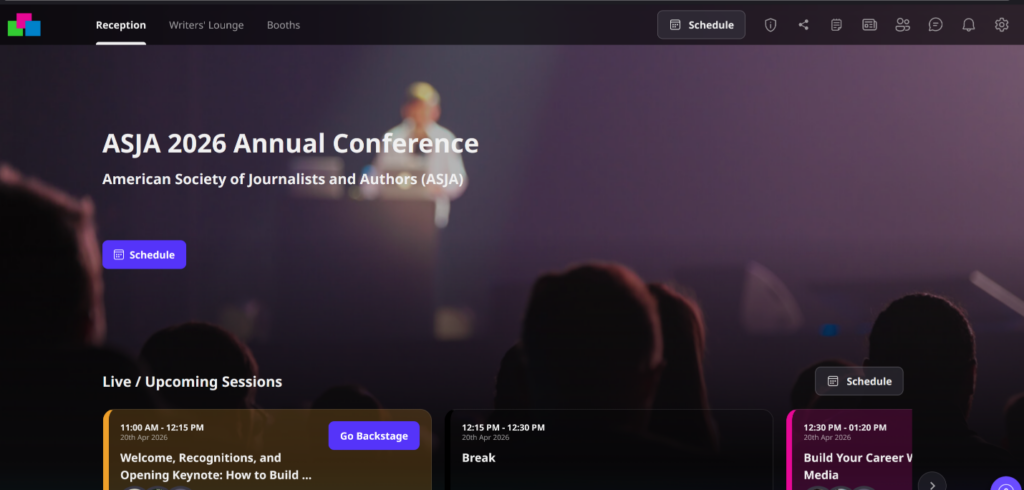
If you’re attending the conference, expect to get an invitation to join the Airmeet conference space by Wednesday, April 15. Once you have your login information, you can head over for a sneak peek.
If you log on before the conference begins, you’ll see a conference calendar and schedule of events broken down by day, session, or track (books, content marketing writing, and journalism). Click on any of those elements to open session descriptions and read speaker bios.
Once the conference starts, you can also:
- Fill out a profile and connect with other conference goers, and send DMs.
- Congregate in a virtual lobby before or after sessions.
- Attend sessions of your choice.
- Visit the Writers’ Lounge,a collection of virtual “tables comparable to mini meeting rooms where people can gather informally between sessions to keep the conversation going, find out about ASJA events and benefits, or hang with friends. Look for more information about the Writers’ Lounge before the event.
- Visit virtual ASJA booths to find out about ASJA committees, membership, benefits, and events. Some ASJA booths will be staffed by member volunteers during the conference.
Read more about Airmeet on the Airmeet FAQ page on the ASJA website.
Tips for Using Airmeet
Here are four things you can do in advance to be ready to use Airmeet for the conference:
1. Do a computer system check. Airmeet is available through your web browser, you don’t need to download a separate app. For the best experience, use Chrome (version 79 or later), Microsoft Edge (all versions), Firefox (version 76 or later), or Safari (which has limited access and known compatibility issues). Browsers that do not work with Airmeet are Chrome or Firefox versions older than those listed, Internet Explorer, and Opera.
To see if your version of Chrome or other browser works with Airmeet, go to the Airmeet FAQ page and follow the prompts to run an Airmeet system check. This 2-minute test checks your internet connection, browser, webcam, mic, speaker, and ability to share your screen (should you need to).
2. Create a profile. Once you receive your 2026 conference invite from Airmeet, use the link to log onto the ASJA conference center and choose a password to create an account. After you set up an account, enhance your profile by adding a headshot, description of your writing work, and links to your social media accounts and personal website (if you want to).
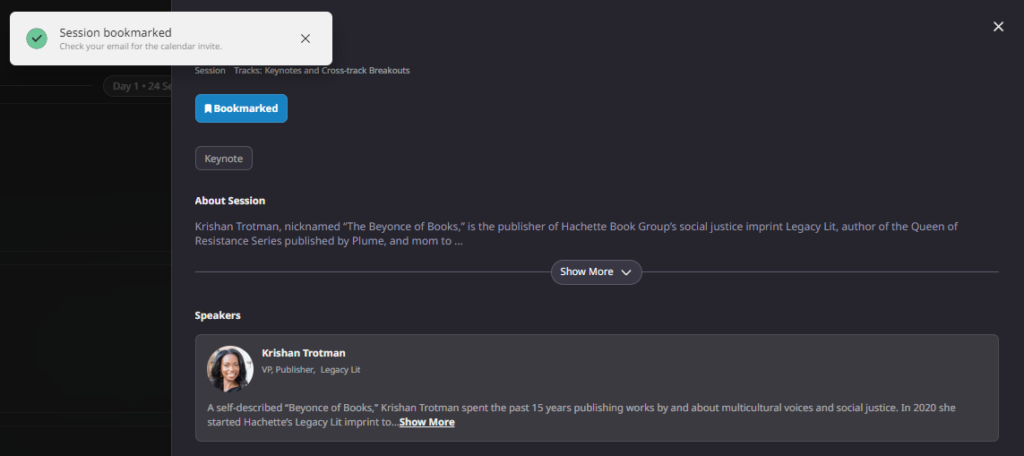
3. Put conference sessions on your calendar. Go to the event conference center and review the full schedule. Click on the Bookmark tool to identify sessions you want to attend. Bookmarking a session automatically sends the date, time, and other information about it to the email address associated with your Airmeet account. From there, you can upload it to your preferred calendar.
4. Read the Airmeet FAQs. If you want more information, Airmeet has the following FAQs that could help:
- Attendee FAQs. Get general information about using the service, troubleshooting internet connectivity problems, joining and interacting at the event, reminders, email addresses, frozen screens, and more.
- Social Lounge FAQs. Get basic how-to information for using the Writers’ Lounge virtual tables. The Writers’ Lounge will have multiple tables devoted to pre-determined topics plus a handful of open tables that anyone can grab for an impromptu meet up. The FAQ explains how to create, join, and leave a table, edit the name of a table, and more.
- Airmeet Accessibility. Get information on services Airmeet offers to ensure all users can access conference sessions, including people with visual and hearing impairments, including closed captioning, automatic transcription, screen reader support, and keyboard navigation.
You can also find help on using Airmeet in the “Airmeet Resources” booth.