
7 Steps to Navigating the New ASJA Member Center

Editors’ note: While most articles on ASJA Confidential offer valuable information to non-members and members alike, this one may seem like member exclusive content. However, as we’re in the midst of our annual membership drive, we thought it wise to give prospective members a little peek behind the scenes into our recently adopted platform, which offers nearly endless ways to connect and build community with other writers. Since the Member Center launched in July, 67% of members have logged in. Here’s hoping this tutorial will inspire the remaining 33% to jump in and explore.
If you’ve seen the emails and social media messages from ASJA over the past few months, you know at least a little about the recent launch of the ASJA Member Center. As the announcements noted, this new all-in-one platform supports all your interactions with ASJA and your fellow members.
But let’s say you haven’t yet made your way to visit the Center and you have a few questions, like: Where is it? What can I do there? What’s in it for me? We’ve got the answers for you right here.
First of all, to reach the Member Center, log in to ASJA, then click on the Portal link next to your name in the upper right portion of the screen. Now here’s a walk-through of what you can do on the platform when you arrive.
1. Add or Update Your Member Information
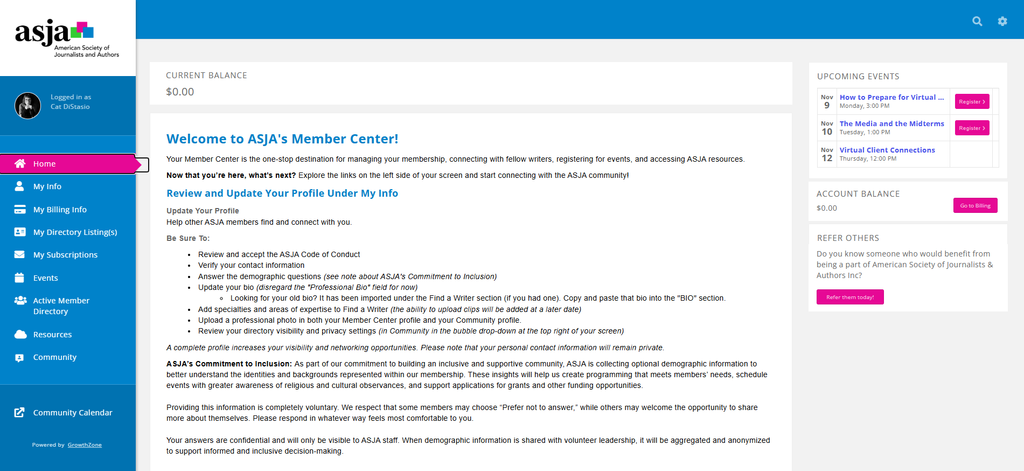
On the left side of the page, click on My Info to add or edit your contact information, your bio, and the list of ASJA committees you belong to. When you scroll down to the FIND A WRITER section below, you’ll find your old bio that you can copy and paste into the BIO field. Along with updating your bio, you can add specialties and areas of expertise to the Find a Writer field. In the future, you’ll be able to upload clips. As for the PROFESSIONAL BIO field you’ll see on this page, ignore that for now..
Directly below the BIO section you’ll see a list of questions under the heading DEMOGRAPHICS (CONFIDENTIAL INFORMATION). Your responses to these questions, which are optional, will help ASJA gain a better understanding of its current membership and inform efforts to broaden the organization’s diversity and inclusion. You can read a statement on the ASJA’s Commitment to Inclusion on the Member Center landing page.
Clicking on the Membership link on the My Info section will take you to a page showing the type and status of your ASJA membership and another link to managing the automatic payment of your membership fee.
The Billing link takes you to a page where you can view and pay ASJA invoices. You can also reach that page by clicking on My Billing Info from the left-side menu of the Member Center landing page.
Back in the My Info section, there’s a Refer Others link that — you guessed it —leads to a form for referring a business or individual for ASJA membership.
2. Add or Update Your Directory Listing
Click on My Directory Listing(s) from the Member Center landing page to view how your listings appear in the ASJA Info Hub and your ASJA Public Website. You can enter or change contact information, descriptions, keywords, and categories. Completing your directory listing makes it easier for someone looking for a writer like you to find you.
3. Register for ASJA Events
Signing up for ASJA Events has gotten simpler. Selecting Events from the Member Center menu lets you see and register for all upcoming events, with either a monthly calendar view or a list view. You can also add the events automatically to your personal calendar.
4. Find Other ASJA Members
Click on Active Member Directory to view an alphabetical, searchable list of other ASJA active members. You can customize your search by location, writer type, subjects, and skills. Using the directory is a great way to expand your professional network, connect with potential collaborators on writing projects, or identify writers with specific expertise for possible referral.
5. Access Member Resources
The Resources page is the hub for all kinds of members-only information and access:
- Help documents
- Health insurance resources
- E-book on Building an Independent Writing Business
- ASJA Confidential Blog
- ASJA Community
- ASJA Retirement Chat (updated schedule to come)
- ASJA Virtual Coffee Chats
- ASJA Monthly DEAI Chat
- ASJA Member Orientation
- ASJA Magazine Issues
- Form for submitting member news
- Volunteer opportunities
- Tools & templates
- Form for submitting paycheck reports
- Paycheck database
- Members-only Facebook group
- Member benefits
6. Access the ASJA Community
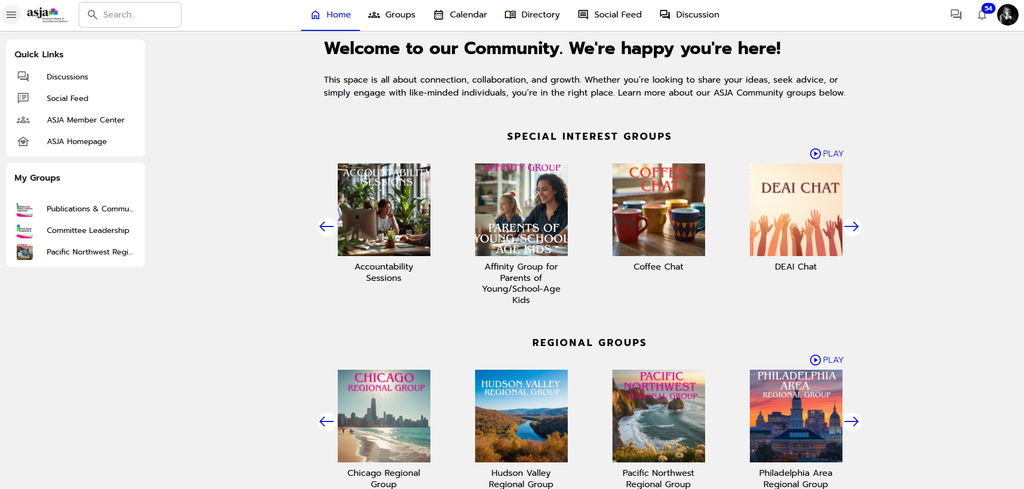
Another left-side Member Center link takes you directly to the ASJA Community, a resource worthy of a few more details about how to explore it. On this page, you’ll see links to all of ASJA’s special interest groups, regional groups, committees, and leadership groups. Follow the links to learn more about these groups and how to join them. Under My Links on the left, you’ll see links to the groups to which you currently belong.
The Community page also lets you join the conversations ASJA members are having. On the top left you’ll find quick links to the member discussion forum and social feed.
Clicking on the bubble at the top right of the screen will get you to a page where you can create or update your Community Profile and upload a photo. (This is separate from your Member Center profile and photo).
7. View a Calendar of Community Events
Back on the Member Center landing page, you can click on Community Calendar from the left side menu to check out upcoming committee and community group meetings at a glance. Via the Schedule link, you can view a monthly calendar that may eventually include all ASJA meetings or you can opt to look at just the one-time, daily, weekly, or annual meetings. Click on My Schedule to view the meetings of the groups you belong to.
The Member Center is designed to help you get the most from your ASJA membership by staying informed, connected, and engaged. Want to know more?
- Access the Member Center and take the GrowthZone Info video tour, or watch it here.
- Start poking around the site yourself to see what’s happening and how you can join in.
**
Sonya Stinson is a New Orleans-based content marketing writer and journalist. She writes frequently about small businesses; innovators in science, technology and the arts; HR and education technology; and the meetings and tourism industry. She’s a member of ASJA’s DEAI and publications committees. Connect with her on Linkedin here.